
Leveling Addons for World of Warcraft
Midnight, the latest WoW expansion, raised the level cap from 80 to 90. If you want to know how to reach level 90 fast, or simply take the guesswork out of leveling, a leveling guide is very helpful.
On this page you can find various leveling guides and addons that should prove useful in the Midnight expansion (levels 1-90).
This page is mainly about leveling addons for modern World of Warcraft (a.k.a. Midnight) but many of them can be used for other game versions, too, such as WoW Classic etc.
Some WoW leveling guides nowadays are available as addons that you view inside the game, that show you exactly where to go and what to do in a step-by-step manner, complete with a navigation arrow that points you in the right direction all the time.
We start with Zygor Guides, because it’s one of the most popular WoW leveling guides of all time.
Zygor Guides: Step-by-step WoW leveling guides
Below, you can see some of the things that Zygor Guides covers:

- Leveling guides for World of Warcraft: Forever are available. See details on Zygor Guides website.
- Leveling guides for WoW Midnight 1-90
- Leveling guides for The Burning Crusade Classic (Anniversary) 1-70
- Leveling guides for WoW Classic 1-60
- Leveling guides for Mists of Pandaria Classic 1-90
- Addon shows instructions inside WoW
- Navigation arrow inside WoW
- Auto-installer to install and update guides and addon
- Step-by-step instructions
- Works for any race and class
- Works for Alliance and Horde
- Adapted to WoW Classic Hardcore
- Updated for Season of Discovery in WoW Classic (ongoing)
- Monthly or 3-month subscription to access ALL WoW guides
- Regular updates
- Free guide samples available
- Includes many other WoW guides for professions, dungeons, gear, gold and more
Zygor Guides are possibly the most popular WoW guides of all time. They offer leveling guides (and other guides) for WoW that are viewed inside the game using their addon.
Zygor have leveling guides for various versions of WoW, including modern World of Warcraft, and versions of WoW Classic, including Forever.
All of Zygor’s leveling guides and other WoW guides are viewed with their in-game addon so you can see them inside WoW, which is very convenient. Don’t worry if you’ve never used an addon before, because Zygor’s automatic installer makes it easy to get started.
So how does it work? Zygor’s addon will give you a waypoint arrow and a small window with instructions right inside the game that show you where to go and exactly what to do all the time, whether you should accept a quest, kill mobs, use an item, turn in a quest, gather items or anything else. This makes it very easy to follow along and level fast, whether you’re a beginner or veteran player.
You get step-by-step instructions for leveling all the way. You can jump in at any level. Whether you want to play Horde or Alliance, or both, WoW Midnight, WoW Classic, WoW: Forever, The Burning Crusade Classic (Anniversary), Mists of Pandaria Classic, or other versions such as Classic Hardcore, Zygor Guides has you covered.
Zygor Guides are beginner-friendly, so even a new player can level very fast.
Zygor Guides have been around for well over 10 years, and have been one of the most popular WoW leveling addons for many years. They’ve been continually improved and updated. Their leveling guides have always been updated for all expansions. The updated leveling guides are typically released in a timely manner, so that you have the latest leveling guides right at your fingertips.
Zygor Guides is a subscription so when you become a subscriber to Zygor Guides, you get access to ALL their WoW guides including leveling guides plus other WoW guides with the same subscription, including all updates and upgrades as long as you’re a subscriber. If you no longer want the guides, simply cancel your subscription.
There are currently two subscription options. Either, you can subscribe monthly for $15 per month, or subscribe for 3 months for $40. Both options can be canceled at any time.
I’ve personally used Zygor’s leveling guides a lot with excellent results.
Pawn addon: Choose the right gear upgrades
Pawn is an addon that helps you decide if a piece of gear is an upgrade for your character or not. It automatically crunches the numbers for you based on built-in stat weightings and shows you the results in your tooltip. Pawn can show different values for each of your specializations, too, as different specs benefit differently from various stats like mastery, haste or critical strike.
As you level up in Midnight, you will of course get lots of gear upgrades, so it’s very handy with an addon like Pawn that quickly lets you decide which armor or weapons to use. It’s useful at max level, too, since you always want to upgrade your gear.
Pawn can also tell you which gems are the best for your different specs. If you’re a veteran player, you can also create your own stat weightings for Pawn to use in its recommendations. Learn more about Pawn on CurseForge.

Pawn tells you if an item is an upgrade for your character. Note the green arrows and numbers added to the tooltip.
Faster Loot addon: Loot at the speed of light
You might not notice it at first, but looting can take a long time when added up, even with Auto Loot enabled in your WoW options. Most players have resigned themselves to a 2 to 3 second window popup causing them to pause between every kill and just see it as unavoidable. Not with Faster Loot!
This addon will make your loot window flash by with enough speed that sometimes you’ll be unable to see it. Best check your bags to see if you got an Epic! With the hundreds (if not thousands) of mobs we will be grinding in Midnight, this simple addon can save you hours of playtime over a long enough period. Even after you reach max level, this is still a great addon to have.
The Faster Loot addon only works if you go into the WoW options and enable Auto Loot, or you’re holding down your “Auto Loot Key” (Shift, Ctrl or Alt) each time you loot to collect everything automatically.
You will find these settings in your WoW options.

Simply go into the game options and search for auto loot and make sure it’s enabled, to make the Faster Loot addon work.
You can download Faster Loot from CurseForge.
Leatrix Plus addon: Auto accept quests & much more
Leatrix Plus adds many quality-of-life improvements to Midnight. All of the features are optional to use so you only have to use the ones you want. Many of them can be useful for questing and leveling, for example:
- Auto repair equipment
- Auto sell grey items
- Automatically turn in and/or accept quests
- Auto loot faster (you may loot so fast that you don’t even see the loot window)
- Add Wowhead links to quests on the world map
- Make the mini map square so you see a bigger area
- Change the size of the mini map
- Skip cinematics faster (remove the confirmation)
- Destroy items faster (you don’t have to type “delete” to destroy any items)
The above is just a small sample of the features in Leatrix Plus. There are many more, but those ones are the most relevant for leveling, in my opinion. You can also use Leatrix Plus for many other neat things, making it a useful addon all-around. You can learn more about Leatrix Plus on Curseforge.
World Map Character Pulse addon: Highlight your character on the world map
Even though I’m a bit embarrassed to admit it, I sometimes wonder where my character is on the world map, especially in new zones and such.
The addon known as World Map Character Pulse fixes this, by giving the player arrow a pulsing animation so you can easily spot it. It even works on party and raid members, too, “pulsing” their location as well.
There is no setup or settings required. Simply install it and watch the effect on the world map.

World Map Character Pulse highlights your player on the world map.
Learn more about World Map Character Pulse on CurseForge.
Deadly Boss Mods addon: Win boss encounters
Deadly Boss Mods, also known as DBM, is an addon that has provided helpful visual and audio alerts during boss encounters, including timers and announcements, to help you know what’s going to happen so that you have a better chance of reacting appropriately.
Deadly Boss Mods has been around for many years, but it seems like some of its functionality will change in Midnight due to changes that Blizzard is making to WoW, that limit what addons can and cannot do. Therefore, Deadly Boss Mods might not be quite as useful in Midnight as it previously was, although it can probably still be helpful.
So if you’re planning on leveling by running dungeons in Midnight, you can download Deadly Boss Mods and hopefully have an easier time winning all the boss encounters.
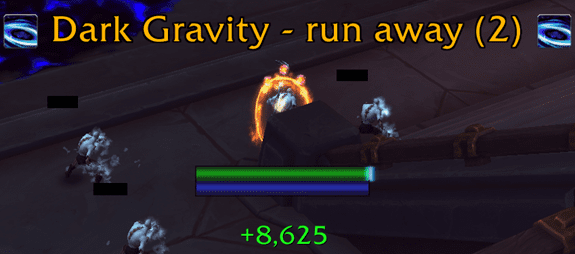
Deadly Boss Mods can give you warnings during boss fights.
Learn more about Deadly Boss Mods on CurseForge.
You also need to download the Deadly Boss Mods Dungeons module and install it to use it in 5 player Dungeons as well as Delves.
TomTom addon: Set your own waypoint arrows
TomTom is a navigation assistant addon for Midnight as well as WoW Classic and Mists of Pandaria Classic.
TomTom allows you to set way points on the world map and mini map and then display a waypoint arrow that guides you to those waypoints.

TomTom can show you a waypoint arrow to the destination you choose. The waypoint arrow can be moved anywhere on the screen and can show you the distance to the waypoint, and how long it takes to get there at your current speed.
TomTom can also set a waypoint to your character’s corpse, which will automatically give you an arrow that guides you back to your character’s corpse. This is enabled by default.
You can set waypoints on the world map and then activate the waypoint arrow to guide you there. This is useful for guiding you towards quest objectives, quest givers, turn-in points etc., to make sure you’re always going in the right direction.
If you find coordinates to a location mentioned in various guides, articles, videos or comments, you can copy and paste those into TomTom and the location will show up as a waypoint. You can then display the navigation arrow to guide you there.
Learn more about TomTom on CurseForge.
Leatrix Maps addon
While questing and leveling, using the world map is obviously essential. Leatrix Maps provides many convenient map enhancements that are optional to use so you can turn on only the ones you want. For example, Leatrix Maps can…
- reveal the entire map (no fog of war)
- remove the map border
- remember your map zoom level
- increase the max zoom level
- show coordinates for the player and cursor
- color the fog of war another color so you see which areas you haven’t explored
- center the map on the player
- and more
Learn more about Leatrix Maps on CurseForge.
BasicMinimap addon
The addon BasicMinimap lets you customize the mini map in various ways. For example, you can…
- make the mini map square instead of round
- show coordinates
- show/hide buttons and indicators around the mini map
- move minimap buttons
- change the size and scale of the minimap
- move the entire minimap
- add a border to the mini map
- and more.
If you end up with settings you don’t like, you can always use the “Reset Profile” button in the BasicMinimap’s options to get back to default. Just type /bmm in the chat to bring up the options.
One of the most useful features, in my opinion, is to bring up the tracking menu by clicking on the minimap. For instance, you can have the tracking menu appear when you right click anywhere on the minimap, and then select what you want to track, e.g. bankers, mailboxes etc.
You can download BasicMinimap on CurseForge.

BasicMinimap lets you customize the mini map in a multitude of ways, changing its shape, size, position, and much more.
Altoholic addon: Level faster with rested experience
As the name implies, the Altoholic addon is mainly useful if you’re leveling more than one character, i.e. you have one or more “alts” (alternate characters that you play). As we all know, you level a lot faster if you’ve accumulated rested experience on a character, because you get double the amount of XP when you kill mobs when your character is in a rested state. This can make a big difference in leveling speed. So in order to level your alts to max level as quickly as possible (counting total time spent), you ideally want to play them when they have full rested experience, which is 150% of a level.
But how do you keep track of how much rested experience your alts have without logging into each one of them individually?
That’s where an addon like Altoholic comes in. Simply put, when you’re logged in on any of your characters, you can use Altoholic to pull up a window that shows you all your other characters (alts) and how much rested experience they have, between 0-150%. That way, you know when it’s worth logging on an alt to do some leveling if you want to take advantage of the rested experience boost. Altoholic can also tell you how many days and hours remain until one of your alts has full rested experience.

Altoholic lets you see how much rested experience your characters have saved up, so you know when it’s time to do some leveling with the added experience bonus.
Furthermore, with Altoholic you can also see your alts’ professions, the contents of bags, bank vaults, equipment, item level, gold, and so much more, without having to log into them individually.
You can download Altoholic on CurseForge.
Azeroth Pilot Reloaded (APR) addon
Azeroth Pilot Reloaded (APR) is a free leveling guide that is displayed with the help of an addon that shows you step-by-step where to go and what to do in order to gain levels. Azeroth Pilot Reloaded is free to download and use, and comes with premade leveling routes that you can follow using the addon. I don’t know whether it will be updated for Midnight, but you can download it and try it and see if there are leveling routes for Midnight.
Azeroth Pilot Reloaded features a window with instructions inside WoW that tell you what to do, step-by-step. There’s also a waypoint arrow that shows you where to go (and how far) to get to the right location to complete the steps in the leveling guides.
You can download Azeroth Pilot Reloaded on CurseForge.
BeQuiet addon: Hide the Talking Head frame
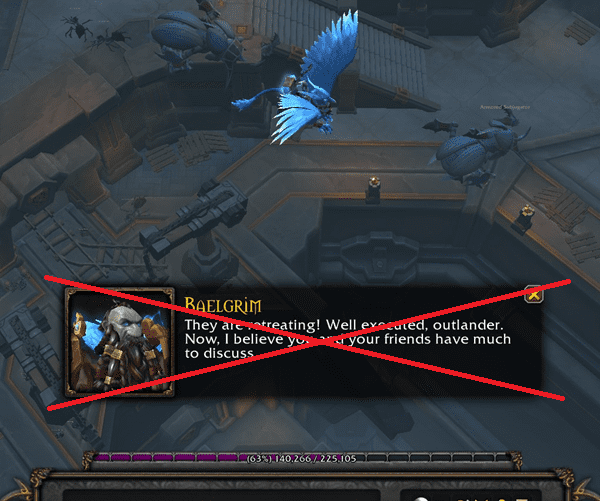
The BeQuiet addon can hide and silence the Talking Head frame. You will still see the dialog in the chat window so you’re not missing anything.
The Talking Head frame with an NPC talking during questing and leveling can be annoying and distracting, since it’s quite big and can get in the way of other things like action bars. There’s also no real purpose of it. While you can move it to a less prominent place on your screen using Edit mode, there’s no easy way to hide it, as far as I know.
Fortunately, the addon BeQuiet was designed for this. BeQuiet hides and silences the Talking Head frame (yes, it’s actually called that). You will still see the dialog from the Talking Head in the chat window so you’re not missing anything. BeQuiet can also show a warning in the chat that a Talking Head has been hidden. Furthermore, you can whitelist zones so the addon doesn’t hide the Talking Head in those zones. A very nice little addon if you find the talking head distracting, It’s also easy to set up. Download BeQuiet on CurseForge.
Wowhead Quick Link addon
Wowhead Quick Link is a simple yet effective addon that makes it much easier to create links to Wowhead from within WoW. Simply mouse over any quest and press Ctrl+C and a Wowhead link that you can copy will appear in a window. You can change the keybind to anything you want. You can also easily configure the links to go straight to the comments section on Wowhead, since that is usually where you find helpful comments on how to complete quests etc. Wowhead Quick Link can also generate Wowhead links to many other things like items, currencies, NPCs, factions, spells and mobs. These features are obviously useful for any questing and leveling. Learn more on CurseForge.
ExtraQuestButton addon
ExtraQuestButton is an addon that gives you a large and visible button for the appropriate quest item, that only shows up when you’re in the right area to use it. That way, you know that it’s time to use the quest item, and it’s easy to see and click. You can also keybind it and the window can be moved anywhere you want on the screen. A simple, yet neat, quality-of-life addon.
This is useful because quest items that you’re supposed to use can be hard to find in your bags, while it’s equally challenging to click the impossibly small quest item icon in the quest tracking window. Or you might not even realize that you’re supposed to use a quest item on a certain quest at all. That’s why ExtraQuestButton is so convenient. Learn more on CurseForge.
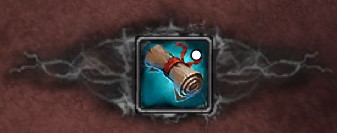
An extra button will pop up when you can use a quest item for a quest that you’re on when you have ExtraQuestButton installed.
DialogKey – Numy Edition addon: Use buttons to “talk” to NPCs
“DialogKey – Numy Edition” is an addon that makes questing and leveling easier by providing some simple keyboard shortcuts to the NPC dialog windows.
Want to accept a quest? Press spacebar. Turn in a quest? Again, press spacebar.
With “DialogKey – Numy Edition” installed, any time you’re talking to an NPC and there’s only one option, you can usually just press spacebar to select it. If there are several different options, such as multiple quests or gossip options, you can press 1, 2, 3 etc. on your keyboard. There are different versions of DialogKey; the one called “DialogKey – Numy Edition” seems to be the most current for Midnight.
Learn more about DialogKey – Numy Edition on Curseforge.
The “DialogKey – Numy Edition” addon lets you select dialog options with your keyboard. If there’s only one option (like turning in one quest or accepting one quest), you can just press space.
Scrolling entering / leaving combat text. Updated for Midnight
This is a somewhat “hidden” feature you can enable to alert you when you enter and leave combat, which is nice while leveling (or any other time). You do not need to install anything to use this feature.
This “setting” lets you know when you leave combat by including it in the scrolling combat text as a red text message.
There are certain things you can only do out of combat, such as eating, drinking, using your mount, logging out, and more. We tend to do these things a lot while leveling, and we often want to do them immediately when we drop out of combat. However, it’s sometimes easy to miss that you’ve left combat after a battle, and that it’s possible to use your mount, eat/drink etc.
What you need to do is open your chat box (typically pressing enter) and type:
/console floatingCombatTextCombatState_v2 1
Then hit enter. Then you need to reload the user interface by typing…
/reload
…in the chat box. If you want to turn it off again, use the following command:
/console floatingCombatTextCombatState_v2 0
Again followed by enter and then /reload.

The “Leaving Combat” text will float upwards as soon as you’re out of combat.
To make this work, you need to enable “Scrolling Combat Text for Self” in the game options. See image below.

Enable Scrolling Combat Text for Self in the game options; it’s required to make the entering/leaving combat text work. You can find the setting by searching in the options.
Conclusion
There are many free addons that can help with various aspects of questing and leveling, and quality of life improvements, some of which are listed on this page.
If you’re looking for a step-by-step leveling guide that you can view inside WoW as an addon, Zygor Guides seems like a solid option. I’ve used Zygor Guides to level in many expansions, and I think they make great leveling guides for World of Warcraft and have a proven track record.